
Crowd Funded Accessible Game Campaign Needs Support
1 Comments Published by OneSwitch.org.uk on Sunday, May 19, 2013 at 5:39 PM.

My Carnival hopes to become a video game for children with Cystic Fibrosis. If it reaches it's funding total, it will be released free of charge on PC. It's a laudable project, by the proven and brilliant AccessAble Games, but it needs support or it won't happen this way. 12 days to go at the time of writing...
Via: Javier Mairena on the IGDA GASIG mailing list. Poster below.
Read more »
Labels: PC
Accessible Design at Global Game Jam 2013
0 Comments Published by OneSwitch.org.uk on Tuesday, February 26, 2013 at 5:29 AM.

Global Game Jam is an annual game hack weekend, where teams around the world are given a common theme to work to (this year's was 'heart beat'), and divide into teams to produce an entire end to end functioning game by the end of the 48 hours. Read on...
Read more »
Labels: Audio Games, GGJ, One Switch Games, PC
Slalom, the Videogame
1 Comments Published by Javier Mairena on Friday, September 30, 2011 at 7:15 AM.
Wheelchair Slalom is a sport for people with cerebral palsy, in which the players go through a course made up of various obstacles and tests in the shortest time possible.
'Slalom, the Videogame' provides an insight into the sport without the need for space, time and personnel required for its practice.
Read more »
Labels: AcceessAble Games, Closed Captions, Eye Tracker Games, Free games, Game Therapy, One Handed, One Switch Games, PC
Attractor accessibility usage statistics
1 Comments Published by Javier Mairena on Wednesday, May 25, 2011 at 2:49 AM.

Read more »
Labels: Free games, PC, Statistics
Attractors is a simple puzzle game developed by The Game Kitchen with AccessAble Games as accessibility advisor. The game have special accessibility options like: no time limit, no death, possibility to restart a level at any time, change game speed, one switch mode, microphone control mode, high contrast and no-click mode.
You can play it for free at: www.thegamekitchen.com/attractor
Also, you can download it and place on our own web site. Take it from here: www.thegamekitchen.com/attractor/attractor-redis01.zip
While playing, press ESC to return to main menu; you will return to the level that you have left when you click play again on main menu. Main menu and between levels menu are also accessible for one switch and no-click mode.
Attractor's option screen:

Labels: AcceessAble Games, Free games, Head Tracker Games, High Visibility, One Handed, One Switch Games, PC
To Hell with Johnny
0 Comments Published by OneSwitch.org.uk on Wednesday, October 27, 2010 at 4:29 PM.
Michi.nu have a reputation for producing games with some of the best thought out and diverse accessibility features seen anywhere. Their latest, To Hell with Johnny, goes even further, as demonstrated in the amazing top video.
Great accessible fun for Halloween. Expect to see a review at the Accessible GameBase soon. Available to buy from Michi.nu for £10 ($15 USD) for PC with Mac version due soon.
Labels: Mac, One Switch Games, PC
More golf accessibility? It's possible to play Everybody's Golf for PSone and PS2 in one-switch style (again without fully accessible menus) using a PC, emulator and 4Noah utility. For something much easier to get going, I'd highly recommend trying out the 2D mini-golf accessible classic Mini Golf 1-Button Style by Danjo, which is fully one-switch compatible.
For those thinking of producing their own accessible golf game, I recommend taking a look at our GASIG Top 3 Accessibility Tips for a Golf game.
Labels: PC
 "Your Mother, taught you well!" vs. "You were never much of any thing!", the goading is a huge part of the fun in Tig Duels: For Extraordinary Gentlemen and Such Etc.
It's a really well balanced, thought-out, barmy fencing game for two one-switch players. Choose your control, choose your head, then duel. If that wasn't all good enough, you can also challenge people on-line by slapping their faces with a glove.
Can you think of any reason why all modern day fighting games could not have a one-button / one-switch game mode now?
Reviewed over at the Accessible GameBase with short video.
Labels: Campaigning, One Switch Games, PC
 Imagine Wii Sports Tennis in the dark, and playable, and you have VI Tennis. It's a brilliant idea and happily, is well executed too. You'll need one or two Wii remotes, a Bluetooth equipped PC (I bought a USB Bluetooth dongle for 99p from eBay which works fine) and the free PC download of VI Tennis.
All game play is through sound, feel and motion. I did find setting up tricky on my Windows 7 machine, but once it was, I was away. Reviewed over at the Accessible GameBase. Over at VI Fit, they also have an audio Wii-remote version of Bowling, which will hopefully be a sign of many more games to come.
Labels: Audio Games, PC, Wii
"Stemming from years of military-based research by Accelerond, VisionPlay is a revolutionary new video game technology that allows any low-resolution, off-the-shelf webcam and low-end PC to do full-body positioning and motion analysis."
Link via: Videojuegos Accesibles
Labels: Accessible Controllers, PC
Accessible Gamebase
1 Comments Published by OneSwitch.org.uk on Friday, January 15, 2010 at 2:26 AM.
 SpecialEffect launch their Accessible Gamebase today and it's a big deal. They are hoping to build an active community and are actively encouraging people to contribute. After a little familiarisation you'll hopefully find it really easy to learn all about good accessible games as well as how to add your own content.
Here's some of my personal highlights: Bayonetta review, some one-switch games I'd never seen before, some excellent videos and the switch gamers group. That just scratches the surface. Be really good to see you over there valued blog-reader.
Labels: Accessible Gaming Sites, Mac, PC, PS2, PS3, Wii, Xbox 360
Retro You're Brand New
0 Comments Published by OneSwitch.org.uk on Sunday, October 18, 2009 at 5:12 PM.

William Pilgrim has created a 4Noah utility aimed at making a number of Atari VCS (aka 2600) games playable with the SPACE BAR alone. Set an accessibility switch to this and you can make games, that were never designed to be, one-switch accessible.
Asteroids can be played in a few different ways. One way would be where you tap your switch to adjust your aim whilst auto-fire is locked on. It can also be played as a game of chicken, with your switch set to hyperspace, whilst 4Noah VCS triggers constant firing and rotation.
Bowling with 4Noah VCS allows you to aim, throw and even adjust your aim once the ball has been thrown.
Combat allows you to battle with Bi-planes or Jets using a single switch against a second human opponent.
Space Invaders allows you to play alone one-switch style and even co-operatively with a second player helping you to destroy the invaders.
All this doesn't just open up previously inaccessible games to some disabled gamers. It also offers a fun way to bring a new challenge to old games. For more late 70's early 80's nostalgia I've knocked up a little accompanying Spotify music playlist. For more William Pilgrim work, please visit the fledgling 4Noah Laboratory.
Post via the OneSwitch.org.uk Blog.
Labels: One Switch Games, PC
The Factory: Game for Helen RR 2008 Winner
0 Comments Published by OneSwitch.org.uk on Wednesday, April 29, 2009 at 4:08 AM.
 Within the blog pages of Australia's The Age is an interesting article on Retro Remakes competition winner "The Factory" by Shane Hockings. I personally find the game very tough, and sorely needing a tutorial with a few demonstration solutions (see the image above for some help).
This said, I do think there's a lot of satisfaction to be had when/if it finally does click. Belated congratulations Shane. Uploaded to the OneSwitch gaming library here.
Labels: A Game For Helen, One Switch Games, PC, RR 2008
Mystic Mine - Multiplayer One Switch Game
0 Comments Published by OneSwitch.org.uk on Tuesday, February 10, 2009 at 3:14 PM.
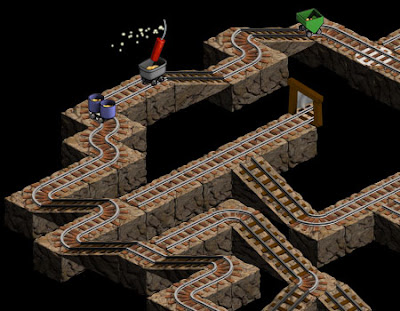 Just released this February - Mystic Mine is now available to buy on-line at Koonsolo for $19.95 (use www.xe.com for a currency conversion). It's massive fun as a multi-player game and highly recommended by OneSwitch.org.uk. If I had an all time top 10 list of one-switch games this would be a strong contender to make the list. Free demo version available here. Sweet.
Labels: One Switch Games, PC
Access Controller - Video Review
0 Comments Published by OneSwitch.org.uk on Wednesday, December 17, 2008 at 7:12 PM.
Labels: One Handed, PC, PS2, PS3, Videos
Judecca: Mind Controlled Game
0 Comments Published by OneSwitch.org.uk on Wednesday, October 15, 2008 at 12:23 PM.
 Square Enix and NeuroSky revealed a suitably Halloween timed game at this year's Tokyo Game Show in Judecca. Supposedly when the gamer is in a relaxed enough state of mind they will see Zombies (which I'm guessing they have to use a mouse and keyboard to shoot) in this First Person Shooter.
More at: NeuroSky, Engadget, Gamer Tell and Slippery Brick.
Labels: brain control, PC
 Graeme's Free Games presently features some highly accessible versions of Namco's all-time classic Pac-Man. All feature the option to reduce the number of ghosts as well as giving the facility to adjust the speed of the ghosts and your Pac-Man independently.
There's a really well thought out one-switch version that features the best solution I've seen yet to navigating a maze at speed. A mouse compatible version offers a way to play for head-tracker, eye-tracker and other users too. This too offers a really well thought out solution.
For those wanting to play the exact same version that Namco released in the arcades back in 1980/81 - take a look at 4Noah for a potential solution: One-Switch Pac-Man - Mouse controlled Pac-Man.
Labels: Eye Tracker Games, Head Tracker Games, Mac, One Switch Games, PC
Strange Attractors 2
0 Comments Published by OneSwitch.org.uk on Tuesday, September 2, 2008 at 5:55 PM.
 Strange Attractors 2 has arrived. It's possibly the most polished and ambitious one-switch game ever written. Kick the Tyres here (the demo) or buy the full game for $14.95 (£7.50 ish). It's superb. I love it.
 For those wishing to learn more, there's a great interview with Eric Walker of Ominous Development over at AbleGamers.com.
Labels: One Switch Games, PC
 War Twat is fierce. And despite it's unrelenting difficulty, actually demonstrates some very fine accessibility traits.
1. It uses a nice and simple control scheme (the cursor keys and the CTRL key to fire) that also works to start and restart a game.
2. There's a high-visibility version.
3. There's a non-sweary version.
Not great for people prone to photo-sensitive seizures though I must say. Fierce!
Labels: High Visibility, PC
Design Tips For: Eye Tracker Games
0 Comments Published by OneSwitch.org.uk on Saturday, August 23, 2008 at 12:40 PM.
 Written in collaboration with SpecialEffect.
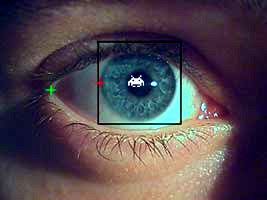
An EyeTracker is an interface that translates and maps eye movements to on-screen pointer control. Where ever your gaze falls on the screen, your pointer will also fall. In many ways, an EyeTracker simply replicates what a mouse does.
So you can move a pointer about on-screen with your eyes and that's all very good, but how do you click? Well that depends upon your ability.
1. Some will be able to click on some kind of switch (see this House of the Dead YouTube demo), typically using a specialised switch interface and switch. Random examples include blink switches, bite switches and light pressure finger switches.
2. For gamers unable to do this, reliant purely upon their eyes, a Dwell Clicking utility will often be needed. Here a click is made once your pointer has hovered over an area of the screen for a pre-set length of time. With some dwell clickers, you might see an animated progress bar or clock attached to the pointer whilst it hovers denoting how long before a click is activated.
For more advance use, Dwell Clickers can give control over double-clicks, dragging, right clicks and more via an on-screen floating control panel. N.B. For compatibility with the greatest number of Eye Tracker and Dwell Clicker combinations, it's normally very important that your game includes the option to run it within a window. You can test out with a number of free dwell clickers here and here using a mouse alone.
3. The final alternative for independent play is: Don't Click It! - Make a game that doesn't need a click in the first place (try this on-line game Doeo but imagine a click free front menu).
Eye Tracker Essential Considerations:
A. Some gamers using Eye Trackers will not be able to focus on a spot as quickly nor as accurately as the average person using a mouse. Allow for this by including meaningful variable difficulty levels and ideally a speed control option if relevent to your game. Very importantly, make clickable target areas larger than you normally might. They should be at least 3cm in diameter on an average sized monitor, as a rough guide.
B. Bear in mind that an Eye Tracker gamer does not have the flexibility of a gamer using a real mouse to look at a different area of the screen to where they are moving their pointer. Where the Eye Tracker looks is where the pointer goes. There is a way around this though, seen in games such as Demon Attack and Endurance Kaboom which lock movement to a horizontal plane.
C. Games requiring large numbers of clicks can become a chore very quickly for people using dwell-clicking. Consider a way of reducing the number of clicks needed (as seen in The Pyramid and Demon Attack with an optional Auto-Fire feature).
D. Games that wait indefinitely until you take your turn can suit many Eye Tracker gamers. These include the likes of Peggle and Bejewelled, point and click adventure games, board games such as Chess, sports games such as darts, bowling, golf and pool and more. These games are more sympathetic to slower reaction times and also to people who get fatigued. Which leads me onto...
E. A way to pause the game. With more action based games, a optional way to pause at anytime can be very useful. See The Pyramid and Demon Attack.
F. Avoid forcing use of the keyboard at any stage (isn't that obvious?). Although an external on-screen keyboard utility could be used for the likes of high-score name entry - it's important that you don't force gamers into needing to do this. Some won't be able to and will find themselves trapped. This might especially be the case if they have opted to play your game full screen for whatever reason.
Some inspiration for creating great Eye Tracker Games:
Whacka-Monty Mole - whack-a-mole game - features an auto-hammer mode for those unable to click quickly - large targets and meaningful difficulty level adjustment.
6 Differences - spot the difference game - would be improved with an optional easy version with the (invisible) target areas increased in size to the 3cm in diameter rough guide mentioned above. as this game stands, it require extremely accurate control, putting it out of reach of many.
Penalty Shoot Out - a game of luck - but once started - very, very clear.
Demon Attack - locking movement to a single plane (horizontal or vertical) can help with higher speed games such as this, with auto-firing a must here.
Peggle - another game that locks movement to a single-plane but this time in a more thoughtful slower paced game.
The Pyramid - mouse based control with auto-fire and the ability to pause at any time. the menu options are too small for some though.
UA-Chess - great examples of scan and select methods. again some of the text menu options are very small.
Doeo - great idea, and although fast, with a simple adjustment (very easy = collect 20 Doeos for example) - and larger menu options this game becomes highly playable.
Magic Marbles - large target areas - playable completely at your own pace.
Switch Friendly Games - A number of traditional board games compatible with Eye Trackers.
GameAccessibility.com - Head Tracker games forum.
OneSwitch Blog - Eye Tracker posts.
CPU Killer - Utility to slow a computer down.
Special Effect - YouTube BBC Video.
A couple of extra ideas to think about. One solution to adding optional Eye Tracker compatibility to a game is to overlay large semi-transparant icons over a game screen. Another solution would be to underlay invisible mapped areas of the screen to give control over arcade type games. Take a look at this 4Noah adaptation of Nintendo's PunchOut on YouTube. You would need a central "dead zone" where your eyes could rest and take in the on-screen action. You could then flick your eyes to the top or bottom of the screen to throw a high or low punch, or flick your eyes to the left or right of the screen to weave and block.
Retro Remakes, Special Effect, OneSwitch and the IGDA's GASIG are all very happy to take a look at any works in progress, to give support and ideas for tweaking and improving accessibility. Often times there might be just one or two things stopping an average game from being a really great game for disabled/enabled gamers. It would be great to have the opportunity to support people in getting the best out of their ideas.
Labels: Design Tips, Eye Tracker Games, PC
