
BlindComputerGames.com
1 Comments Published by OneSwitch.org.uk on Wednesday, February 16, 2011 at 5:16 AM.


"blindcomputergames.com is an information resource that includes:
A set of guidelines for developers who want to improve blind accessibility in their games.
An article for gamers who are blind to help them show developers how to make their games accessible to them.
Articles that give developers technical information, including code samples, to help them make their games accessible.
For gamers, it gives the technical words they need to communicate with developers at companies, big and small. It explains who to talk to, what information the developer will need, and when in the development cycle to communicate with a developer and to have the best chance of obtaining the changes that will increase accessibility.
For developers, it explains screen readers and self-voicing, and includes a blind accessibility checklist, some good example games, technical “how to's”, and a short guide to blind etiquette.
It's totally free and requires no registration.
The project took three months and was done at the request of and with the help of Dark, the administrator for audiogames.net and the leading advocate for blind gamers.
He is frequently asked by developers, "What would it take?" Now he has a place to send them, and a place to send his readers who have a game or other software program that they can “almost use”.
Although it is focused on games, much of the information is applicable to any software, not just games.
Any feedback would be helpful."
Via: Eleanor Robinson - 7-128 Software on the IGDA GASIG mailing list.
Labels: Audio Games, Design Tips
GASIG: Top 10 Ways To Improve Game Accessibility
0 Comments Published by OneSwitch.org.uk on Friday, November 19, 2010 at 6:03 PM.

1.Allow all controls (mouse, keyboard, gamepad) to be remapped.
2.Add closed-captioning for all dialogue and important sound-effects.
3.Provide documentation in an accessible format (HTML or plain-text).
4.Provide assist modes (auto-targeting, training options, etc).
5.Provide a broad range of difficulty levels from incredibly simple to difficult.
6.Make interface fonts scalable.
7.Allow for high-contrast colour schemes.
8.Add audio tags to all significant elements (actors, doors, items, resulting actions, etc) in true spatial 3D.
9.Allow for a varied range of control over play-speed.
10.Announce accessibility features on packaging.
The above is the original "Top 10 Ways To Improve Game Accessibility" from the IGDA's Game Accessibility Special Interest Group. We will be reworking this shortly, and plan to bring a centralised point of managable game accessibility advice for designers and programmers. There's a renewed energy at the GASIG. Good times are ahead.
Meanwhile, here's a bit of a jumble of superb game accessibility resources: Deaf Gamers Classification system; GameAccessibility.com Resources; GASIG Top 3 Accessibility Features [for specific game types]; OneSwitch.org.uk Design Tips for Accessible Games,Reid Kimball: Mockup of Heavy Rain with Closed Captions (aka fully subtitled). Eelke Folmer's Help You Play wiki. UA-Games articles including the superb Parallel Game Universes; Electronic Soup Podcasts on AudioGames and playing with a Visual Impairment; RetroRemakes - Barriers in Games.
We plan to tidy existing and new game accessibility resources into a much more managable place for people wishing to learn about how to implement effective Game Accessibility features in their games. It's coming...
Image above and list layout by Tim Chase from 2005ish.
Labels: Design Tips
Design Tips For: Subtitled Games
1 Comments Published by OneSwitch.org.uk on Saturday, June 19, 2010 at 4:32 AM.
Full subtitles (aka Closed Captions if you live in the USA or Canada) in a game, can make the world of difference to deaf and partially-hearing players. Now that games and films have so many parallels, imagine how hard it would be to follow a film without the sound-track. It's not much a stretch to imagine how hard some games become without sound.
My friend, Reid Kimball, has posted a really helpful Mockup of Heavy Rain with full closed captioning. It shows some of the importance of having the mood of music described, the sound effects as well as the essential dialogue.
Reid is offering a service to advise game developers upon how to best include deaf and partially-hearing players. He definitely knows his stuff, after having worked with the team that modified Doom 3 to include full subtitles, and spending many years supporting the IGDA's Game Accessibility Special Interest Group.
Labels: Closed Captions, Design Tips
Ubisoft Commits To Include Subtitles In Future Products
0 Comments Published by OneSwitch.org.uk on Wednesday, September 10, 2008 at 1:36 PM.
 Ubisoft have started to listen to the deaf-community struggling with their games for want of some subtitles. Scanning through the comments over at Kotaku gives an idea of the problems gamers have had - and also some of the ignorance that causes these unnecessary barriers.
All fingers are crossed that Ubisoft will be offering full "Closed Captioned" subtitles - with description of important sounds, music and the direction of sounds. They could do a lot worse than to take a peek at Games[CC], Deaf Gamers and Game-Accessibility.com for guidance.
Via: Sandra Uhling on the GASIG mailing list.
Labels: Closed Captions, Deaf Gamers, Design Tips
Design Tips For: Head Tracker Gamers
0 Comments Published by OneSwitch.org.uk on Wednesday, August 27, 2008 at 5:20 AM.
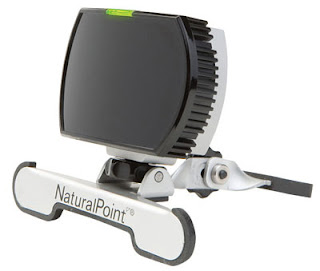 A Head Tracker is a device that translate human movement to on-screen pointer control. As with an Eye Tracker, a Head Tracker also replicates what a mouse does in function.
A typical head tracker consists of an all-in-one camera and light source that points directly at the user. The user wears a reflective dot, on the peak of a cap or finger tip for example, which beams back a small spot of light to the camera. This reflected light is tracked and translated into corresponding pointer movement. If the user tilts their head up, the on-screen pointer moves up. If they look left, the on-screen pointer moves left too.
So, if a game can be played with a mouse alone, it's playable (to a degree) with a head-tracker or eye-tracker. Take a look at the "Design Tips For: Eye Tracker Games" which is very relevent, but do take the following key points into account:
1. A Head Tracker gamer will generally find it easier to accurately manipulate an on-screen pointer than an Eye Tracker gamer will.
2. Head Tracker users can generally move their pointer deliberately to an approximate point whilst looking at an entirely different part of the screen. Eye Tracker users can not do this normally (unless a plane of movement is locked to a certain area - such as with Demon Attack or a Super Breakout type game).
Retro Remakes, Special Effect, OneSwitch and the IGDA's GASIG are all very happy to take a look at any works in progress, to give support and ideas for tweaking and improving accessibility. Often times there might be just one or two things stopping an average game from being a really great game for disabled/enabled gamers. It would be great to have the opportunity to support people in getting the best out of their ideas.
Labels: Design Tips, Head Tracker Games
Design Tips For: Eye Tracker Games
0 Comments Published by OneSwitch.org.uk on Saturday, August 23, 2008 at 12:40 PM.
 Written in collaboration with SpecialEffect.
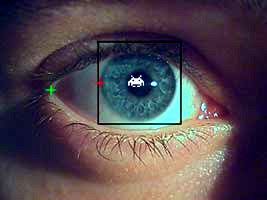
An EyeTracker is an interface that translates and maps eye movements to on-screen pointer control. Where ever your gaze falls on the screen, your pointer will also fall. In many ways, an EyeTracker simply replicates what a mouse does.
So you can move a pointer about on-screen with your eyes and that's all very good, but how do you click? Well that depends upon your ability.
1. Some will be able to click on some kind of switch (see this House of the Dead YouTube demo), typically using a specialised switch interface and switch. Random examples include blink switches, bite switches and light pressure finger switches.
2. For gamers unable to do this, reliant purely upon their eyes, a Dwell Clicking utility will often be needed. Here a click is made once your pointer has hovered over an area of the screen for a pre-set length of time. With some dwell clickers, you might see an animated progress bar or clock attached to the pointer whilst it hovers denoting how long before a click is activated.
For more advance use, Dwell Clickers can give control over double-clicks, dragging, right clicks and more via an on-screen floating control panel. N.B. For compatibility with the greatest number of Eye Tracker and Dwell Clicker combinations, it's normally very important that your game includes the option to run it within a window. You can test out with a number of free dwell clickers here and here using a mouse alone.
3. The final alternative for independent play is: Don't Click It! - Make a game that doesn't need a click in the first place (try this on-line game Doeo but imagine a click free front menu).
Eye Tracker Essential Considerations:
A. Some gamers using Eye Trackers will not be able to focus on a spot as quickly nor as accurately as the average person using a mouse. Allow for this by including meaningful variable difficulty levels and ideally a speed control option if relevent to your game. Very importantly, make clickable target areas larger than you normally might. They should be at least 3cm in diameter on an average sized monitor, as a rough guide.
B. Bear in mind that an Eye Tracker gamer does not have the flexibility of a gamer using a real mouse to look at a different area of the screen to where they are moving their pointer. Where the Eye Tracker looks is where the pointer goes. There is a way around this though, seen in games such as Demon Attack and Endurance Kaboom which lock movement to a horizontal plane.
C. Games requiring large numbers of clicks can become a chore very quickly for people using dwell-clicking. Consider a way of reducing the number of clicks needed (as seen in The Pyramid and Demon Attack with an optional Auto-Fire feature).
D. Games that wait indefinitely until you take your turn can suit many Eye Tracker gamers. These include the likes of Peggle and Bejewelled, point and click adventure games, board games such as Chess, sports games such as darts, bowling, golf and pool and more. These games are more sympathetic to slower reaction times and also to people who get fatigued. Which leads me onto...
E. A way to pause the game. With more action based games, a optional way to pause at anytime can be very useful. See The Pyramid and Demon Attack.
F. Avoid forcing use of the keyboard at any stage (isn't that obvious?). Although an external on-screen keyboard utility could be used for the likes of high-score name entry - it's important that you don't force gamers into needing to do this. Some won't be able to and will find themselves trapped. This might especially be the case if they have opted to play your game full screen for whatever reason.
Some inspiration for creating great Eye Tracker Games:
Whacka-Monty Mole - whack-a-mole game - features an auto-hammer mode for those unable to click quickly - large targets and meaningful difficulty level adjustment.
6 Differences - spot the difference game - would be improved with an optional easy version with the (invisible) target areas increased in size to the 3cm in diameter rough guide mentioned above. as this game stands, it require extremely accurate control, putting it out of reach of many.
Penalty Shoot Out - a game of luck - but once started - very, very clear.
Demon Attack - locking movement to a single plane (horizontal or vertical) can help with higher speed games such as this, with auto-firing a must here.
Peggle - another game that locks movement to a single-plane but this time in a more thoughtful slower paced game.
The Pyramid - mouse based control with auto-fire and the ability to pause at any time. the menu options are too small for some though.
UA-Chess - great examples of scan and select methods. again some of the text menu options are very small.
Doeo - great idea, and although fast, with a simple adjustment (very easy = collect 20 Doeos for example) - and larger menu options this game becomes highly playable.
Magic Marbles - large target areas - playable completely at your own pace.
Switch Friendly Games - A number of traditional board games compatible with Eye Trackers.
GameAccessibility.com - Head Tracker games forum.
OneSwitch Blog - Eye Tracker posts.
CPU Killer - Utility to slow a computer down.
Special Effect - YouTube BBC Video.
A couple of extra ideas to think about. One solution to adding optional Eye Tracker compatibility to a game is to overlay large semi-transparant icons over a game screen. Another solution would be to underlay invisible mapped areas of the screen to give control over arcade type games. Take a look at this 4Noah adaptation of Nintendo's PunchOut on YouTube. You would need a central "dead zone" where your eyes could rest and take in the on-screen action. You could then flick your eyes to the top or bottom of the screen to throw a high or low punch, or flick your eyes to the left or right of the screen to weave and block.
Retro Remakes, Special Effect, OneSwitch and the IGDA's GASIG are all very happy to take a look at any works in progress, to give support and ideas for tweaking and improving accessibility. Often times there might be just one or two things stopping an average game from being a really great game for disabled/enabled gamers. It would be great to have the opportunity to support people in getting the best out of their ideas.
Labels: Design Tips, Eye Tracker Games, PC
 A pure "One Switch Game" is one that can be started, played and replayed using just one control. Typically that will be via the SPACE BAR and the LEFT MOUSE BUTTON (both doing exactly the same thing).
For disabled gamers unable to use conventional mouse, keyboard or joypad controls, for what ever reason, one-switch gaming can bring independence and much greater fun.
Imagine these messages appearing in your favourite game, and you'll get part of the picture:
• "Press a key [that you can't possibly reach] to continue"...
• "HIGH SCORE! Now get someone else to enter your name on the keyboard because you can't play on until they have"...
Sticking to the SPACE BAR / Left Mouse Button control scheme also ensures compatibility with the maximum range of alternative controllers on a PC. These controls can then be positioned in such a way that each gamer can comfortably operate them, such as mounted by the head (example photo). For further info take a peek at these switches and switch interfaces to learn a little more on this "assistive technology".
One-switch standard game controls:
A. The SPACE BAR and LEFT MOUSE button should both function as the default player one control. A default PLAYER TWO control (if needed) should be operated via The RETURN key and RIGHT MOUSE button.
B. Ideally you should allow players to user-define their controls if they wish to break from this standard (as seen in the one to five player game, Scorch Went Bonkers). All this should ensure compatibility with vast majority of switch interfaces.
C. The ESCAPE key should function as a way to QUIT the game back to the front menu screen. From the front menu screen, pressing ESCAPE again should exit to windows. Ideally, a menu based system will be provided enabling gamers to exit to windows using the SPACE BAR or LEFT MOUSE button.
The following links provide some examples of how to get around the control restrictions but still offer fantastic fun games (by the way - not all follow the standards set out above).
Penalty Shoot Out - a game of luck - but once started - very, very clear.
Run Rabbit Run 3D - pure one-switch controls.
Strange Attractors - aimed at the top end of ability - but compelling and unique.
Orbit Racers - one switch accessible menus - hectic racing.
Alien Abduction - timed games give more play than lives based games for some.
Alice Amazed - highly polished one or two player game.
The Pyramid - a must see for the inspirational number of accessibility features.
Aurikon - difficulty level adjustment from super easy to super hard.
Eelke.com - one-switch research projects: FPS, Bejewelled, Super Monkey Ball, Second Life and Super Mario Kart.
UA-Chess - great examples of scan and select methods. rules a problem for some.
Switch Access to Technology - A pretty comprehensive guide from the Ace Centre.
Additional accessibility wants for a one-switch game?
1. Inclusive difficulty level options (see Aurikon). Easy should mean easy! Remember that the average person using their head to hit a switch won't have the reaction speeds of an average person using their finger on a small button. Rapid hits may be a problem too for some, as might holding a button for a long time. Give it some thought, as there's often a pretty simple solution.
2. If the game has a number of user-definable options (such a choice of playing interface, e.g. one-switch, joystick or mouse) allow the game to auto-save and auto-load the settings.
3. What ever else you can cram in...
But the main wish over all, is simply to see more fun and accessible one-switch games!
Retro Remakes, Special Effect, OneSwitch and the IGDA's GASIG are all very happy to take a look at any works in progress, to give support and ideas for tweaking and improving accessibility. Often times there might be just one or two things stopping an average game from being a really great game for disabled/enabled gamers. It would be great to have the opportunity to support people in getting the best out of their ideas.
Labels: Design Tips, One Switch Games, PC
